Offshore delivery centers
Chandigarh Delivery Center
GR Square (D-254), Industrial Area
Sector 75, Chandigarh, India
Pune Delivery Center
S.No. 30, DNK Square, 111-112
Airport Road, Sakore Nagar, Viman Nagar
Pune, Maharashtra 411014, India

The L1 agent. Alert Navigator analyzes every alert, prioritizes by materiality, and completes first-pass triage. Cases that need a decision escalate to L2 analysts with the context to decide.
Noise Reduction
Faster Triage
Mean Time to Detect
Alert Navigator runs the L1 workflow from intake to an escalation L2 can act on

Ingests alerts, removes duplicates, and correlates across sources, reducing noise by up to 90%.

Normalizes alert data across sources and completes first-pass triage, classifying each alert as True Positive or False Positive.

Prioritizes alerts by materiality, using asset, user, and business impact context.

Maps each alert to users, devices, and assets. The blast radius is in the case before L2 opens it.

Reconstructs the attack path and the sequence of events across your infrastructure for each escalated case.

Drafts step-by-step containment and eradication recommendations. The L2 analyst decides what to execute.

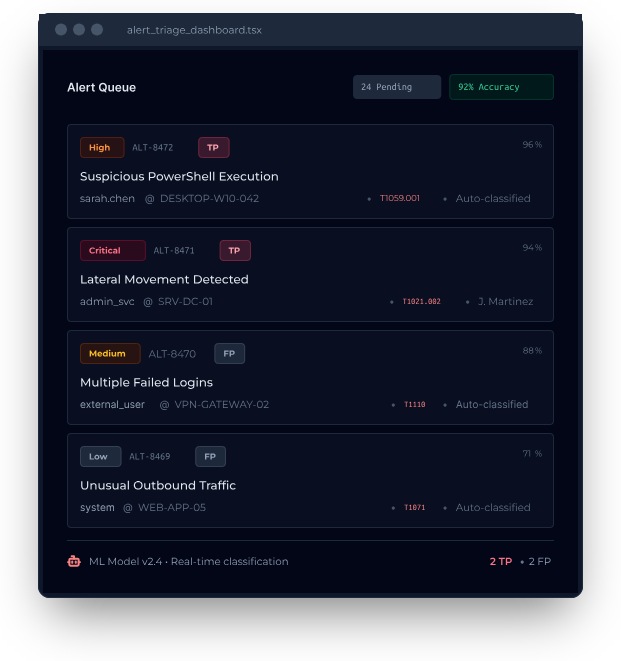
Machine learning models classify each alert as True Positive (TP) or False Positive (FP) and attach a confidence score and MITRE ATT&CK mapping. Low-confidence results escalate to an L2 analyst.
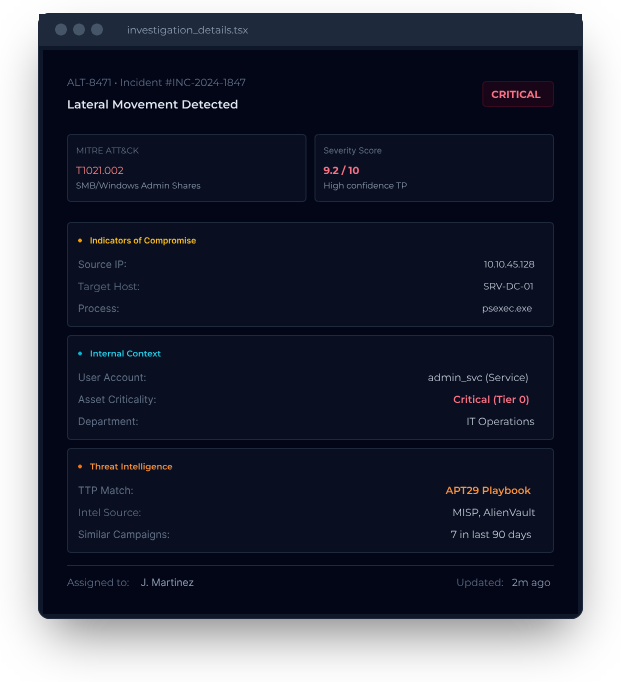
Every escalated case carries enriched context from internal systems, threat intelligence feeds, and external sources such as CMDB and MITRE ATT&CK, in one view. L2 starts from evidence, not a raw alert.
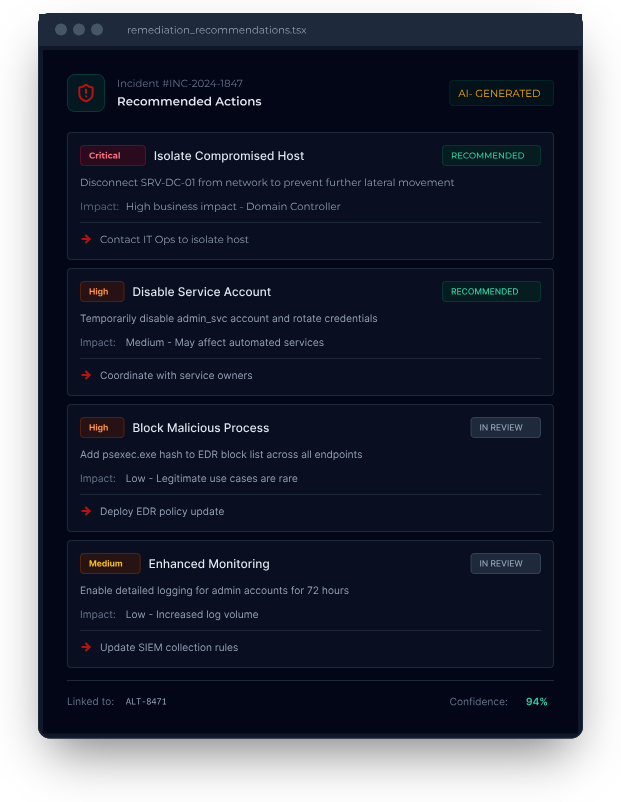
Alert Navigator generates prioritized remediation recommendations from the threat context. Each action lists business impact, requirements, and next steps. The analyst decides which actions to take.
See Alert Navigator work an L1 queue and escalate cases to L2 with the context for a decision
See the platform in action • 30-minute demo • No commitment required


 CyForte.ai
US headquarters
11501 Dublin Blvd
Dublin, CA 94568
United States
Offshore delivery centers
Chandigarh Delivery Center
GR Square (D-254), Industrial Area
Sector 75, Chandigarh, India
Pune Delivery Center
S.No. 30, DNK Square, 111-112
Airport Road, Sakore Nagar, Viman Nagar
Pune, Maharashtra 411014, India